
security
From AI security tests to a description of the system
If your architecture diagram is one box labelled “AI”, that box is doing a heroic amount of work.
Somewhere inside it are an application, a route to a model, perhaps a database, and whatever permissions allow it to do something useful. When a security test produces an interesting result, those details become rather less optional. Someone will ask which setup you tested. “The one that was running on Tuesday” only gets you so far.
On 5 November 2026, Injectionator’s introduction to n8r-surface and Researcher walkthrough put some practical tools around that problem. There is an open model for describing the connected system, a small LibreChat example, and experimental ways to investigate it and save what you find.
For Viewyonder’s Surfaces work, this is an interesting development: a way to carry the context of an investigation along with its findings. Let’s start with the actual plumbing.
LibreChat, with the lid off
The project’s basic LibreChat reference has four components and three connections. LibreChat uses MongoDB Atlas for storage. Its inference requests go through a Codex provider bridge to Codex subscription inference.
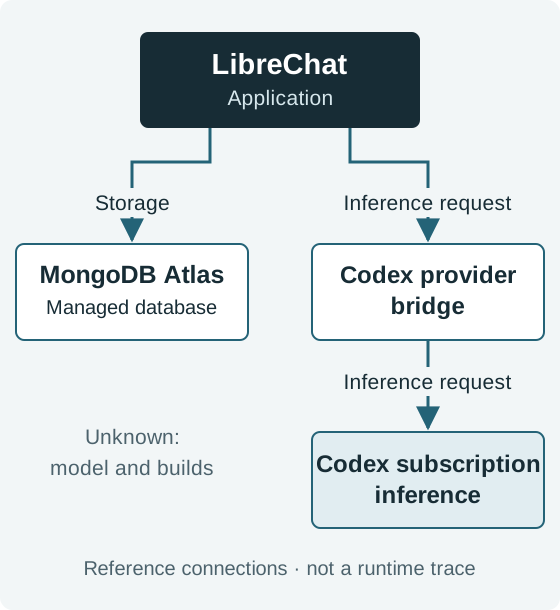
Open the connection diagram at full size. A sanitised reference composition, not a runtime trace.
Already, there is something to investigate. An inference question leads to the bridge. A storage question leads to Atlas. The single “AI” box has become a few places where you can look for an answer.
Injectionator’s author reports assessing LibreChat’s repository and using this composition in a working implementation. The public reference illustrates that composition; it does not independently verify the running system. The selected model, exact builds and full configuration remain unknown. MCP and RAG are not configured in this reference, which says nothing about LibreChat’s wider capabilities.
Nor does the file supply the bridge implementation, credentials or a complete deployment recipe. Identifying a pinned bridge build is a useful next check. The recreation requirements keep the other missing pieces visible. A diagram is helpful; it has yet to develop the habit of installing its own dependencies.
From trying a prompt to describing the experiment
Injectionator’s stated direction is to investigate setups that can be inspected: try prompts, observe controls, change components and compare results. The newer n8r-surface work tackles the accompanying question: how do you describe that setup well enough for someone else to understand it?
The project develops the AI Surface Model, which describes components and their directed relationships. Applications, language models, authentication services, databases and tools can all appear, with configuration and evidence attached where available. It can be used independently of Injectionator for configuration research, inventories or security investigations.
You can start with one connection. If you know an application uses an authentication service but have not identified the product, record the dependency and the gap. Later findings can add the product, version and supporting database while retaining the component’s identity. More detail need not mean starting the investigation again. The model explanation sets out this approach.
This gives the testing perspective in A Chatbot Is Not the Surface somewhere to keep its context. It is a conceptual development from experiments towards shareable system descriptions, rather than a release-by-release history.
Tuesday’s result still belongs to Tuesday
Suppose an application changes from a shared tool-service account to permissions associated with each user. Yesterday’s test may explain the shared-account behaviour very well. It does not suddenly become evidence about the new permission path because someone updated the diagram.
The model separates definition revisions from deployments, dated observations and Experiment Runs. Its intended semantics retain both the definition revision and the effective setup used by a Run. These are draft concepts; the full model is not a contract already enforced by every tool.
A connection also has different evidence states. An endpoint can be declared in configuration, shown to be reachable, or exercised by a particular request. Those facts answer different questions. This develops the distinction in The AI Surface Convergence Continuum: a capability can be claimed, available, enabled or used in the path that matters.
A blank field can mean several things
“Unknown” is a perfectly useful answer when it stops someone confidently filling the gap with a guess. The model gives missing information a little more vocabulary:
| State | How to read it |
|---|---|
| Unknown | The available description does not establish the answer. |
| Omitted | Relevant detail has deliberately been left out. |
| Redacted | Information has been withheld from this representation. |
| Absent | There is a claim of absence within a stated scope. |
| Out of scope | The description does not attempt to cover this area. |
An unknown version gives you something to check. A redacted credential tells you why it is unavailable here. An unrecorded security control may still exist. These small distinctions help keep a partial map useful without pretending it is complete.
Something you can try without building a lab
The Researcher skill, version 0.1.8, guides an assistant through sources it can access and produces Markdown working notes. The notes retain components, relationships, citations, unresolved questions and dated human decisions. Numbered successors preserve earlier notes; continuation includes rechecking source access and identity. The Researcher guide explains the workflow.
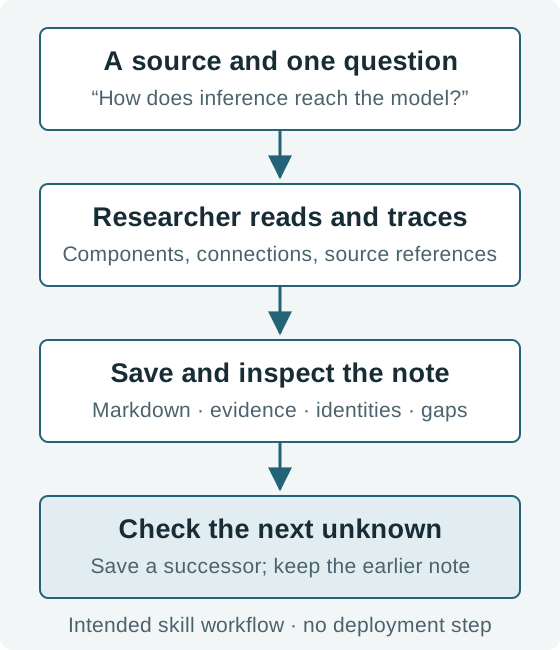
Open the research workflow at full size. The skill works through the assistant’s available source access.
With the skill installed and the LibreChat reference available to your assistant, a useful first request is:
Trace how this LibreChat reference connects storage and inference. Keep its component and relationship IDs, cite the source, and distinguish declared connections from runtime evidence. Save a Markdown note, read it back, and suggest one next check. Do not deploy anything.
You can inspect the result against the small graph above. No database or running LibreChat installation is needed for this source-reading exercise. The published walkthrough covers installation and the fuller prompt.
There is also a standalone command and library. The introductory command walkthrough uses @n8r/surface@0.1.0-experimental.2 for research and explicit Markdown saving. Separate command documentation covers bounded HTML/JSON artifacts, reopening and revisions. The skill’s output remains working notes: version 0.1.8 does not generate validated n8r.research/0.1 HTML or n8r.surface/0.1 definitions.
Where could a control actually intervene?
For security work, Skeleton Surface v0.1 is a compact Markdown brief of the relevant connections and potential interception points. It asks what a control could see and whether the evidence supports observing, modifying, blocking or requiring approval. It also retains routes that bypass the control. The Skeleton Surface walkthrough demonstrates the intended investigation using synthetic source material.
For example, a model proposing a tool call and an application executing it are separate stages. Evidence that a control examines the proposal does not establish that it can prevent execution through every route. A background worker might invoke the same service elsewhere. A useful description makes that route visible or records that it remains unexamined.
The LibreChat reference above does not establish such an interception mechanism. It can identify where further investigation is needed, but cannot demonstrate that a security integration works.
What this means for Surfaces
Viewyonder’s Surface Assessment starts with one application domain and one AI surface. We follow what the application can access and affect, establish what is observable, and explore whether there is a credible path to detect and protect.
A description like this could help prepare that investigation. It could show where retrieved content enters a request, where a tool action executes, or which unknown version needs checking before an experiment can be repeated. When work moves between teams, keeping source references and unresolved questions beside the connections could save the next person from reconstructing the whole story.
It could also help when the system changes. Keep the earlier description, compare the new evidence, and identify which paths deserve another test. That is a more useful handover than “we checked the AI”.
These are possibilities for using n8r-surface, not an announcement that Viewyonder has adopted it as a delivery standard. Its value will depend on whether it helps an investigation reach a better-supported decision.
How far has it been checked?
The command article records a successful research-and-note-save rehearsal. That check did not cover fresh setup, deployment verification or lab recreation. The skill article’s own review covered installation, downloads and source reading, but did not complete save/readback or continuation testing. It separately cites project verification records, which have their own scope.
The model and tools remain experimental. Structural validation does not establish factual completeness, security, interoperability or successful recreation. There is no released universal schema or automatic deployment engine. Building labs from descriptions is a development direction.
For now, there is a useful, modest starting point: take one connection you need to understand and see whether the resulting note helps you investigate it. If you have an application and a question about what it can access or affect, bring that surface to Viewyonder.
Sources and attribution
This article draws on Injectionator’s What is n8r-surface and the AI Surface Model? and Understand your AI system with n8r-surface Researcher, both dated 5 November 2026 and checked on the live site. The diagrams and assessment commentary were prepared for this article; the connection diagram follows the pinned reference below.
Technical explanations adapt documentation by AI Surface Model contributors, reviewed at revision 3effc41bf7e8466651722b7b4c64035f862b1901. The LibreChat example uses revision e0ef3a4037791ce1c6eac05f446339ce9b9c0928. Source prose is licensed under CC BY 4.0; explanations here have been rephrased and arranged for this article. Project code and machine-readable examples use Apache 2.0. See the project’s licensing guide.